
MagicMirror Module: mmm-zabbix-alerts
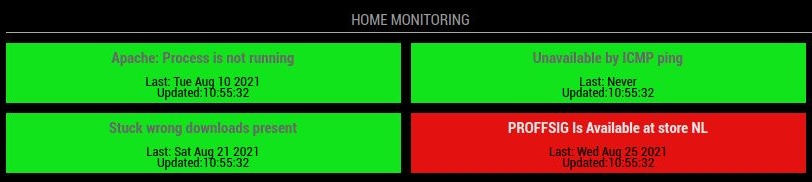
mmm-zabbix-alerts is a MagicMirror2 module that reads selected Zabbix triggers and displays their current status as colored cells.
The module is intended for dashboards where a small number of important triggers must stay visible at a glance. It can render the classic 2x2 view, a compact 4-cell single row, 6 triggers across 2 rows, or any other layout controlled by the number of columns.

Features
- Shows selected Zabbix trigger statuses from the Zabbix JSON-RPC API.
- Uses green cells for OK triggers, red cells for active problems, and gray cells for trigger IDs that were not found.
- Supports flexible grid layouts through
listSizeandcolumns. - Supports compact display mode with smaller spacing and font size.
- Can hide the Last and Updated timestamps to reduce the module height.
- Truncates long trigger names with an ellipsis so cells stay aligned.
Installation
Go to your MagicMirror modules directory:
cd ~/MagicMirror/modulesClone this repository:
git clone https://git.juliochegedus.com/spectronet/mmm-zabbix-alerts.gitRestart MagicMirror after adding the module configuration.
Basic Configuration
Add the module to the modules array in config/config.js:
{
        module: "mmm-zabbix-alerts",
        position: "top_left",
        header: "Zabbix Alerts",
        config: {
                apiSearch: "http://monitor.domain.net/api_jsonrpc.php",
                zbx_user: "admin",
                zbx_pass: "admin",
                listSize: 4,
                columns: 2,
                compact: false,
                showLastUpdated: true,
                triggerIds: [ "1234", "2345", "3456", "4567" ]
        }
},
Compact Layout Examples
4 Triggers In One Row
Use this when you want the smallest vertical footprint:
{
        module: "mmm-zabbix-alerts",
        position: "top_left",
        header: "Zabbix Alerts",
        config: {
                apiSearch: "http://monitor.domain.net/api_jsonrpc.php",
                zbx_user: "admin",
                zbx_pass: "admin",
                listSize: 4,
                columns: 4,
                compact: true,
                showLastUpdated: false,
                triggerIds: [ "1234", "2345", "3456", "4567" ]
        }
},
6 Triggers Across 2 Rows
Use listSize: 6 and columns: 3 to render 3 cells per row:
{
        module: "mmm-zabbix-alerts",
        position: "top_left",
        header: "Zabbix Alerts",
        config: {
                apiSearch: "http://monitor.domain.net/api_jsonrpc.php",
                zbx_user: "admin",
                zbx_pass: "admin",
                listSize: 6,
                columns: 3,
                compact: true,
                showLastUpdated: false,
                triggerIds: [ "1234", "2345", "3456", "4567", "5678", "6789" ]
        }
},
Layout Rules
The layout is controlled by two options:
listSizecontrols how many trigger cells are displayed.columnscontrols how many cells are placed on each row.
For example:
| Desired layout | listSize |
columns |
|---|---|---|
| 2x2 grid | 4 |
2 |
| 4 cells in one row | 4 |
4 |
| 6 cells across 2 rows | 6 |
3 |
| 8 cells across 2 rows | 8 |
4 |
Set compact: true when using 3 or more columns, or whenever you want less spacing. Set showLastUpdated: false to hide the timestamp text and keep the cells short.
Configuration Options
| Option | Default | Description |
|---|---|---|
apiSearch |
http://monitor.science.net/api_jsonrpc.php |
Full URL for the Zabbix JSON-RPC API endpoint. |
zbx_user |
GETYOUROWNUSER |
Zabbix API username. |
zbx_pass |
GETYOUROWNPASS |
Zabbix API password. |
updateInterval |
60000 |
How often the module refreshes data, in milliseconds. |
animationSpeed |
1000 |
MagicMirror DOM update animation speed, in milliseconds. |
listSize |
4 |
Number of trigger cells to display. |
columns |
2 |
Number of trigger cells per row. |
compact |
false |
Enables smaller spacing and font size for tighter layouts. |
showLastUpdated |
true |
Shows or hides the Last and Updated timestamp text inside each cell. |
triggerIds |
[ "15272", "18041", "13554", "13078" ] |
Zabbix trigger IDs to monitor. |
fade |
false |
Enables MagicMirror fade behavior for the rendered list. |
fadePoint |
0.25 |
Position where fade starts when fade is enabled. |
initialLoadDelay |
2500 |
Delay before the first API request, in milliseconds. |
retryDelay |
120000 |
Delay before retrying after a failed API request, in milliseconds. |
Zabbix Requirements
The configured Zabbix user must be able to authenticate through the JSON-RPC API and read the configured trigger IDs. The module uses:
user.loginto authenticate.trigger.getto read trigger details.problem.getto check whether any configured trigger currently has an active problem.
Display Behavior
Each configured trigger is rendered as one status cell:
- Green means the trigger is currently OK.
- Red means the trigger has an active problem.
- Gray means the configured trigger ID was not returned by Zabbix.
Long trigger names stay on one line and are shortened with an ellipsis when they do not fit in the cell.
Notes
The old compact setting layout: "line" is still accepted for compatibility. If columns is not configured, layout: "line" is treated as columns: 4.